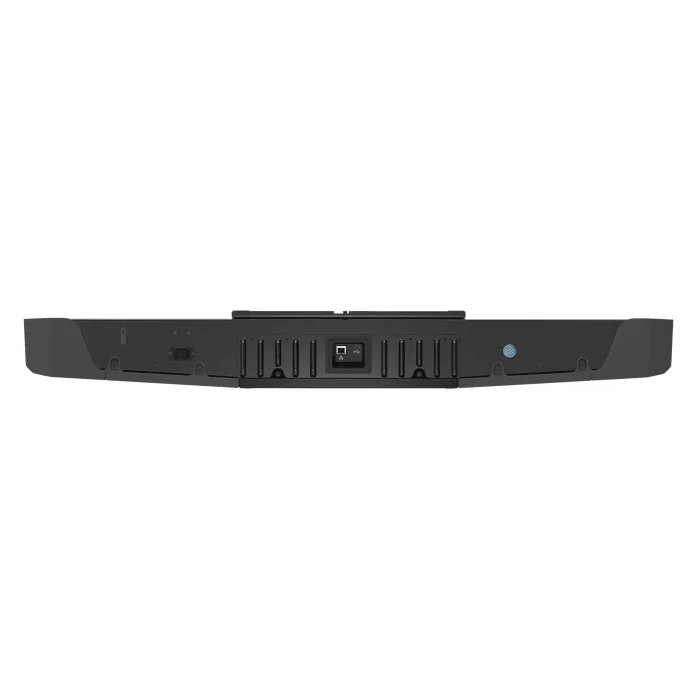
Foresight Falcon Launch Monitor
Añadir opciones
Filet d'Entraînement de Golf Large Deluxe SimSpace - Filet uniquement
Enclos de golf SimSpace (6 tailles) - SIM 0 - (10'10 x 8'2 x 3'3 ft / 3.3 x 2.5 x 1 m)
SimSpace UltraMAX Golf Enclosure - SIM 1 - (8'6 x 8'2 x 4'11 ft / 2.6 x 2.5 x 1.5m)
Enclos de golf SimSpace (6 tailles) - "Le classique" - (8'6 x 8'2 x 4'11 ft / 2.6 x 2.5 x 1.5m)
Enclos de golf SimSpace (6 tailles) - "Le confort" - (9'10 x 8'2 x 4'11 ft / 3 x 2.5 x 1.5 m)
SimSpace UltraMAX Golf Enclosure - SIM 2 - (9'10 x 8'2 x 4'11 ft / 3 x 2.5 x 1.5 m)
Enclos de golf SimSpace (6 tailles) - "Le spacieux" - (11'10 x 8'2 x 4'11 ft / 3.6 x 2.5 x 1.5 m)
SimSpace UltraMAX Golf Enclosure - SIM 3 - (11'10 x 8'2 x 4'11 ft / 3.6 x 2.5 x 1.5 m)
Enclos de golf SimSpace (6 tailles) - "Le premium" - (13'2 x 8'2 x 4'11 ft / 4 x 2.5 x 1.5 m)
SimSpace UltraMAX Golf Enclosure - SIM 4 - (13'2 x 8'2 x 4'11 ft / 4 x 2.5 x 1.5 m)
Enclos de golf SimSpace (6 tailles) - "Le maxi" - (9'10 x 9'10 x 9'10 ft / 3 x 3 x 3 m)
SimSpace UltraMAX Golf Enclosure - SIM 5 - (9'10 x 9'10 x 9'10 ft / 3 x 3 x 3 m)
Enclos de golf SimSpace (6 tailles) - "Le géant" - (13'2 x 9'10 x 9'10 ft / 4 x 3 x 3 m)
SimSpace UltraMAX Golf Enclosure - SIM 6 - (13'2 x 9'10 x 9'10 ft / 4 x 3 x 3 m)
Añadir Tapis de frappe de golf
Tapis de Frappe en Gazon Synthétique 1,50 m x 1,50 m (4' 11" x 4' 11")
Impossible de charger la disponibilité du service de retrait
Delivery Info
+
We offer delivery to many international countries with warehouses located in the USA, UK, Europe and China. For more details, please visit our Shipping policy page.
Setup Guide
+
Foresight Falcon Launch Monitor
Check your simulator layout before installation and ensure there is enough room for both right- and left-handed golfers. The recommended ceiling height is 9.5 to 10.5 feet, with the centre of the hitting mat positioned 10 to 12 feet from the screen and around 4 feet from the Falcon. The ceiling mount should be secured to a suitable ceiling structure by qualified installers, then the Falcon should be latched into the mount. Run the Ethernet cable from the PC, router or network location to the Falcon, connect the power cord to a GFCI-protected outlet or power strip, power the unit on, then complete overhead calibration through the Foresight Calibration App before connecting in FSX Play or FSX Pro.
Specification
+
Foresight Falcon Launch Monitor
- Launch monitor type: Overhead-mounted photometric launch monitor
- Camera configuration: 4-camera Quadrascopic system
- Tracking technology: Infrared object tracking and high-speed, high-resolution camera capture
- Ball data: Ball speed, launch angle, side angle, backspin / total spin, side spin / spin axis, carry distance
- Club data: Club head speed, efficiency, angle of attack, club path, face angle, loft and lie at impact, impact location, closure rate
- Flight data: Carry distance, total distance, peak height, offline distance, curvature, descent angle, hang time, distance from target
- Group data: Dispersion, range, spray, accuracy, range consistency, spray consistency, impact point consistency
- Hitting zone: 139.7cm x 65.6cm
- Hitting zones: Club zone and ball-only zone
- Mount type: Automatic latching ceiling mount
- Impact protection: Replaceable rubberised impact protection
- Size: 1.09m / 1110mm length
- Unit dimensions: 1110mm length x 270mm width x 135mm height
- Weight: 11.8kg
- Frame: Aluminium
- Power supply: Internal
- Power connection: Power cord supplied
- Connectivity: Wi-Fi, Bluetooth, Ethernet and USB-C
- Recommended connection: Direct Ethernet connection to PC or private secure network
- Recommended ceiling height: 9.5 to 10.5 feet
- Recommended screen distance: Hitting mat centre 10 to 12 feet from screen
- Recommended device distance: Hitting mat centre approximately 4 feet from Falcon
- Operating temperature: 35°F to 115°F
- Software connection: FSX Play and FSX Pro
- Calibration: Foresight Calibration App / overhead device calibration software
- Installation note: Installation should be completed by qualified installers, with ceiling structure capable of supporting the required load.
Share

Foresight Falcon Launch Monitor
The Foresight Falcon brings tour-level launch monitor accuracy into a sleek, overhead-mounted design. Built with Quadrascopic camera technology, it captures detailed ball and club data to help golfers practise smarter and play with confidence. Its generous hitting zone gives right- and left-handed golfers the freedom to swing naturally indoors.
Quadrascopic Accuracy
The Falcon uses four high-speed cameras to capture precise ball and club performance data. This gives golfers the feedback needed to understand every shot and improve faster.
- ✓︎Quadrascopic camera technology delivers highly accurate ball and club data.
- ✓︎Measures more than a dozen performance points with every shot.
- ✓︎Captures driver, iron, wedge and putter shots with confidence.
- ✓︎Built for golfers who demand serious practice and fitting insight.
Built for Indoor Simulation
Designed for overhead installation, the Falcon keeps your hitting area clear and uncluttered. Its large hitting zone creates a smoother, more realistic simulator experience for homes and commercial spaces.
- ✓︎Overhead mounting leaves the hitting area clean and obstruction-free.
- ✓︎Large hitting zone supports both right- and left-handed golfers.
- ✓︎Ideal for residential golf rooms and commercial simulator bays.
- ✓︎Smooth gameplay helps create a more immersive indoor golf experience.
Complete Ball and Club Feedback
The Falcon combines infrared object tracking with high-speed, high-resolution camera capture. It measures the key details behind ball flight and club delivery, helping golfers diagnose misses and track progress.
- ✓︎Tracks ball speed, launch angle, spin, carry and shot direction.
- ✓︎Club data includes speed, path, face angle and impact location.
- ✓︎Helps golfers understand strike quality, delivery and ball flight.
- ✓︎Supports meaningful practice, coaching, custom fitting and performance review.
Software and Third-Party Software
The Falcon connects to Foresight Sports software to display shot data, simulation play and performance feedback. Once calibrated, it can be used with FSX Play or FSX Pro, with third-party simulator compatibility depending on software licensing and integration.
- ✓︎Connects with FSX Play and FSX Pro for shot data.
- ✓︎Calibration app is included with new FSX software installations.
- ✓︎Ethernet connection is recommended for reliable simulator performance.
- ✓︎Third-party software compatibility may require additional licences or setup.